SMART MultiStylus with Tool Explorer Technology, Accessory Kit, for Displays with embedded iQ 4
SMART MultiStylus with Tool Explorer Technology, Accessory Kit, for Displays with embedded iQ 4(Shipping to begin in May)
Unlock New Levels of Interactivity
The SMART MultiStylus accessory kit is a versatile interactive tool designed forSMART Board® interactive displays running iQ 4.7 or later.Whether teaching at the screen or moving freely around the room,the MultiStylus enhances collaboration, engagement, and presentation workflows.
- Interact directly at the display or remotely from anywhere in the room
- Dual functionality: pen mode and air‑mouse mode
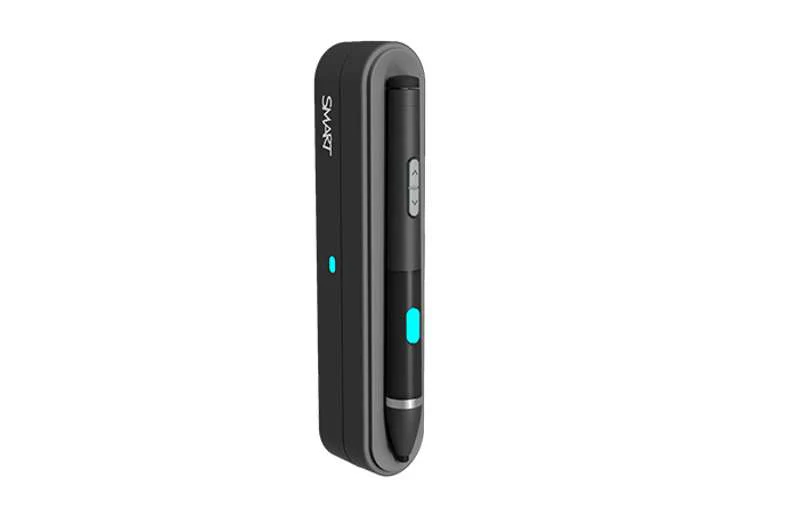
- Docking station for secure storage and fast charging
- Customizable buttons for personalized control
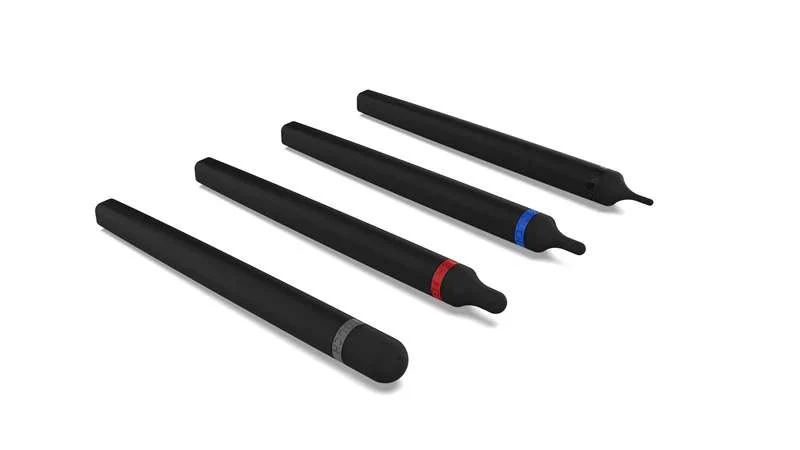
- Integrated Tool Explorer™ (V2) support for cubes and stamps
Designed for Dynamic Learning & Collaboration
Perfect for classrooms and collaborative environments, the SMART MultiStylusempowers users to present, annotate, and interact naturally—without being tiedto the front of the room.
Compatible SMART Board Displays
- SMART Board MX (V5)
- SMART Board MX (V5) Plus
- SMART Board QX (V2) Pro
- SMART Board RX
Supported Functionality
Pen Mode
- Pressure‑sensitive ink with 4,096 levels of pressure
- Color selection and highlighter tools
- Up/Down buttons
- Pressure‑activated eraser
- Quick access to whiteboard tools
Air‑Mouse Mode
- Cursor control
- Highlighter and screen shade
- ESC key function
- Open digital assistant
- Left and right mouse buttons
Tool Explorer™ (V2)
Optional cubes and stamps enhance hands‑on learning and interactive activitiesusing SMART Tool Explorer™ technology.
Design & Controls
- Programmable buttons with LED indicators
- Magnetic mounting for stylus and docking station
- Docking station mounts directly to the display frame
Power & Charging
MultiStylus
- Power Source: Ultra‑capacitor
- Auto‑On: Motion‑activated
- Usage Time: Up to 10 hours (mode‑dependent)
- Standby Time: Up to 168 hours (sleep after 10 minutes of inactivity)
- Quick Charge: 1 minute for up to 60 minutes of use
- Full Charge: 6 minutes
- Charging Method: Wireless charging via docking station
Docking Station
- Power Source: 5V DC
- Power Consumption: < 4.5W
- Connector: USB 2.0 Type‑C input
Environmental Requirements
- Operating Temperature: 41–95°F (5–35°C)
- Storage Temperature: –40–76°F (–40–60°C)
- Humidity: 5–80% RH, non‑condensing
What’s in the Box
- SMART MultiStylus ×1
- SMART Docking Station with Tool Explorer™ (V2) technology ×1
- USB 2.0 Type‑C to Type‑A cable, 3 m ×1
- Hardware set (1 screwdriver, 2 screws) ×1
- Illustrated installation instructions ×1
Product Information
Product Information
Shipping & Returns
Shipping & Returns
Description
SMART MultiStylus with Tool Explorer Technology, Accessory Kit, for Displays with embedded iQ 4(Shipping to begin in May)
Unlock New Levels of Interactivity
The SMART MultiStylus accessory kit is a versatile interactive tool designed forSMART Board® interactive displays running iQ 4.7 or later.Whether teaching at the screen or moving freely around the room,the MultiStylus enhances collaboration, engagement, and presentation workflows.
- Interact directly at the display or remotely from anywhere in the room
- Dual functionality: pen mode and air‑mouse mode
- Docking station for secure storage and fast charging
- Customizable buttons for personalized control
- Integrated Tool Explorer™ (V2) support for cubes and stamps
Designed for Dynamic Learning & Collaboration
Perfect for classrooms and collaborative environments, the SMART MultiStylusempowers users to present, annotate, and interact naturally—without being tiedto the front of the room.
Compatible SMART Board Displays
- SMART Board MX (V5)
- SMART Board MX (V5) Plus
- SMART Board QX (V2) Pro
- SMART Board RX
Supported Functionality
Pen Mode
- Pressure‑sensitive ink with 4,096 levels of pressure
- Color selection and highlighter tools
- Up/Down buttons
- Pressure‑activated eraser
- Quick access to whiteboard tools
Air‑Mouse Mode
- Cursor control
- Highlighter and screen shade
- ESC key function
- Open digital assistant
- Left and right mouse buttons
Tool Explorer™ (V2)
Optional cubes and stamps enhance hands‑on learning and interactive activitiesusing SMART Tool Explorer™ technology.
Design & Controls
- Programmable buttons with LED indicators
- Magnetic mounting for stylus and docking station
- Docking station mounts directly to the display frame
Power & Charging
MultiStylus
- Power Source: Ultra‑capacitor
- Auto‑On: Motion‑activated
- Usage Time: Up to 10 hours (mode‑dependent)
- Standby Time: Up to 168 hours (sleep after 10 minutes of inactivity)
- Quick Charge: 1 minute for up to 60 minutes of use
- Full Charge: 6 minutes
- Charging Method: Wireless charging via docking station
Docking Station
- Power Source: 5V DC
- Power Consumption: < 4.5W
- Connector: USB 2.0 Type‑C input
Environmental Requirements
- Operating Temperature: 41–95°F (5–35°C)
- Storage Temperature: –40–76°F (–40–60°C)
- Humidity: 5–80% RH, non‑condensing
What’s in the Box
- SMART MultiStylus ×1
- SMART Docking Station with Tool Explorer™ (V2) technology ×1
- USB 2.0 Type‑C to Type‑A cable, 3 m ×1
- Hardware set (1 screwdriver, 2 screws) ×1
- Illustrated installation instructions ×1